
| Version | Recommended OS | Compatibility | Requirements (free) |
|---|---|---|---|
| TeslaMap9.0.5.exe | Windows 11, 10, 9, 8, 7, Vista |  |
.NET Framework |
| TeslaMap1.18.2.exe | Windows XP | |
Java Runtime Environment |
| TeslaMap1.18.2.zip | Linux, Mac |   |
Java Runtime Environment |
Was TeslaMap helpful? Buy me a coffee with a small donation to this Bitcoin address:

bc1qlpygqul7uqn6jj7enlzpfdm44v2dkkzq33z9lp
Thanks!
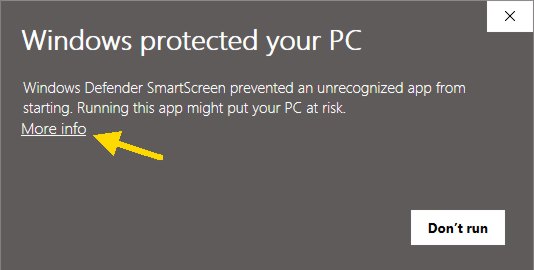
The first time you run TeslaMap on your computer, Windows will show a warning message. When it pops up, click on the "More info" link.
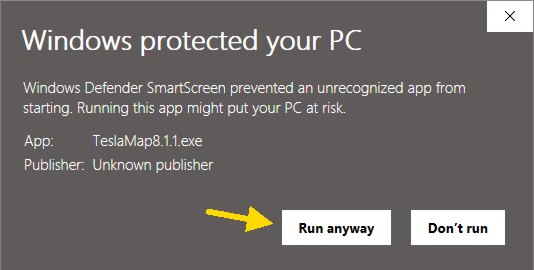
You'll see that I'm an "Unknown publisher".
I recommend that you download TeslaMap then scan the TeslaMap program with your computer's anti-virus, or use a free online virus scanning service like VirusTotal.com. When you find that TeslaMap is clean, you can click the "Run anyway" button to launch TeslaMap.
Feel free to contact me if you have any questions.
Don't forget to download this package of free Tesla coil designs for use with the TeslaMap program. These Tesla coils have been created by experienced builders and are proven to produce excellent results.
Simply download the TeslaMap.exe file and double-click it to run the TeslaMap program (version 9.x.x) or start the installer (version 1.18).
Extract (unpack, decompress) the contents of the teslamap.zip file using Windows (right click on the zip file and choose extract). You may also use 7-Zip (free) or WinZip to extract the zip file. Double click the TeslaMap.jar file to run the program.
If you experience any difficulty please visit the more detailed, step-by-step install guide or contact me.
TeslaMap 9 requires the free .NET Framework from Microsoft to be installed on your computer. Most people already have it installed.
TeslaMap 1.18 requires the free Java Runtime Environment (JRE) from Sun Microsystems to be installed on your computer. Please visit the JRE test website to verify that you have the JRE installed and operating properly. If you do not have the JRE installed, please install it from the Java Runtime Environment install page.
TeslaMap requires a minimum screen resolution of 1024x768.
TeslaMap is only intended to design traditional spark gap Tesla coils. Other types of Tesla coils (solid state, etc.) are not supported.
By downloading the TeslaMap software, you agree to the following terms and conditions:
You agree that the TeslaMap author has made no express warranties to you regarding the software and that the software is being provided to you "as is" without warranty of any kind.
In no event will the TeslaMap author be liable to you for any loss of use, interruption of business, or any direct, indirect, special, incidental, or consequential damages of any kind.