
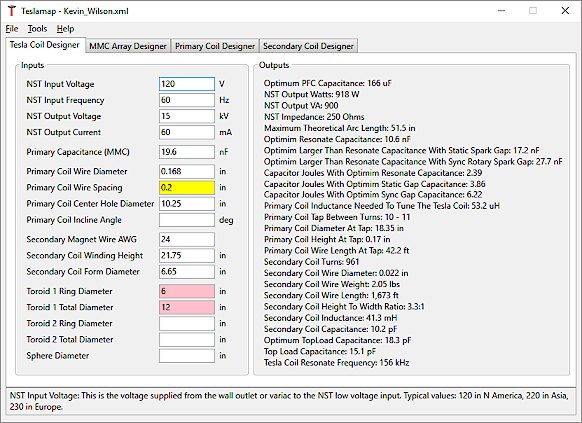
Never designed a Tesla coil before? Don't worry! TeslaMap makes Tesla coil design fast and easy. Simply enter your input values and TeslaMap will calculate the output parameters - that's it!
Select "File" then "Save As..." from the top menu to save your Tesla coil design. A dialog box will prompt you choose a name and location for the design. Once a design has been opened or saved you can re-save the design by selecting "File" then "Save".
Select "File" then "Open" from the top menu to open an existing Tesla coil design. A dialog box will prompt you to select the file you wish to open.
Selecting "File" then "New" from the top menu. This will clear all the input parameters and calculated Tesla coil parameters.
Selecting "File" then "Export To Text File..." or "Export To Web Page..." from the top menu to save the input and output parameters as a .txt file or HTML web page.
Select "Options" then "Standard" or "Metric" from the top menu to change between standard and metric measurements. When switching between metric and standard all the input values will automatically be converted.
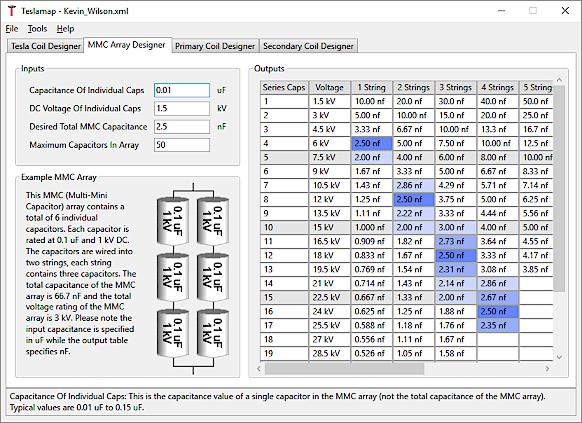
The integrated MMC calculator will make designing your MMC fast and easy.
The TeslaMap program will check your input as you type and alert you by setting the input background to yellow if the input seems unusually large or small. The input background area turns pink if the input creates a design error.
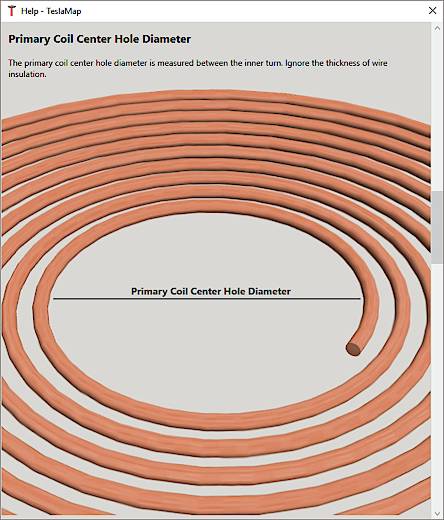
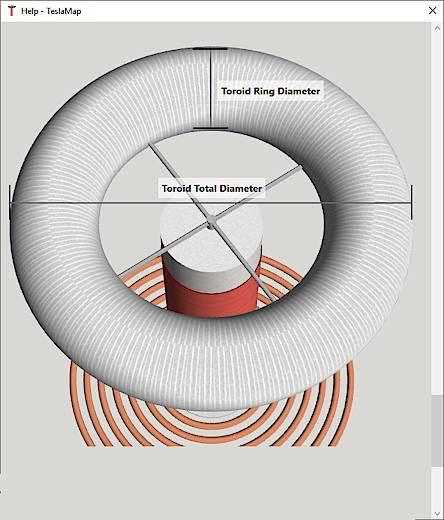
January, 2021
Fixed incorrect NST Impedance output. Thank you Roberto in Italy for reporting the bug!
June, 2019
The calculators (Ohm's law, plate capacitance, peak=RMS and dV/dT) are back.
June, 2019
Redesigned the interface. It appears very similar to previous versions, but it's much more flexible and responsive now. Added a welcome message. Fixed a bug where the desired inductance highlight in the primary coil designer would highlight uH and mH. For example, if the desired inductance was 3uH, then 3uH and 3mH would be highlighted. Improved the design validation check.
June, 2019
Code and interface was converted from WinForms to WPF framework to significantly increase performance. The interface was updated. Several features were added, including design validation, update check and improved error checking. Some output fields were added to main form. The exported HTML page code was improved. The message log was improved. The additional calculators section was removed (it may return in future update). The number of displayed output fields in the calculators has been reduced to increase performance. Removed tooltips.
August, 2017
Redesigned the user interface. Added additional help images.
October, 2016
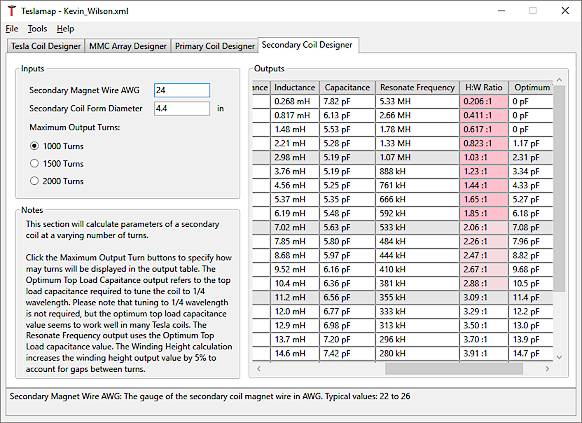
Redesigned the user interface. Enabled resizing and content stretching to the forms. Added additional help texts to several forms. Converted help text to rich text format to increase readability. Added additional help images. Added a new Primary Coil Incline Calculator. Primary Coil Calculator output table increased to 200 turns. Added a new Secondary Coil Calculator.
October, 2015
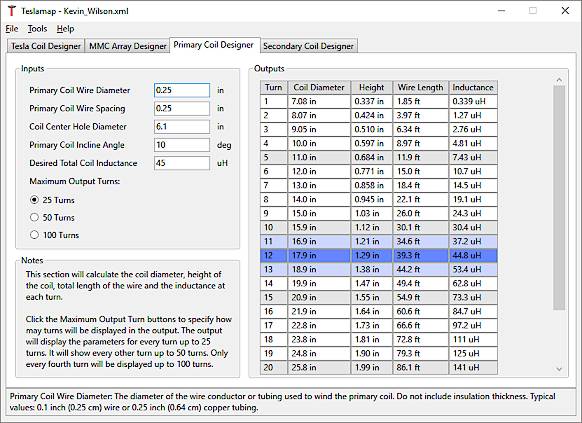
Added a "Desired Inductance" input to the Primary Coil Calculator to highlight the turns that will create whatever inductance you want.
September, 2015
Moved the primary coil parameter table from the main screen to it's own "Primary Coil Calculator" tab. Added a skin depth calculator. Made some cosmetic improvements. Updated the target .NET Framework to 4.6.
September, 2013
Fixed an error in the Ohm's Law calculator. When given Power and Voltage inputs, the Current output was incorrect.
August, 2013
Added the option to export the design summary to a web page in HTML format. The new web page format uses tables to make the summary layout much more user friendly. Alternate rows are colored, but all the color is removed when you print to save your insanely expensive ink.
July, 2013
Corrected a couple bugs. Corrected the "Optimum Topload Capacitance" output unit from kHz to pF. Entering "0" for "Primary Coil Incline Angle" no longer displays a warning message.
April, 2013
Added a message bar at the bottom of the main form that displays helpful information and error messages. Added small buttons next to the output fields that show helpful information in the message bar. Added an AWG to inch / mm conversion in the "Calculators" page. Also made some cosmetic improvements.
March, 2013
Fixed a bug that caused a error message to repeatedly appear if the user only enters a decimal point.
March, 2013
Several small improvements have been made and some new features have been added. The program now includes several helpful calculators. The interface has a more native look and feel. TeslaMap version 6 has been re-written in C#. Version 6 does not require the Java Runtime Environment (which can be an inconvenience for some users). However, version 6 does require the .NET Framework from Microsoft (which almost all Windows computers already have). Also, version 6 will only run on Windows.
What happened to versions 2-5? TeslaMap was originally written in VB for Windows only. This development path encompassed versions 1-5. At that point TeslaMap was re-written in JAVA for Windows, Mac and Linux. This version started at version 1 (by this time the VB version had progressed to version 5). The newest version of TeslaMap has been written for Windows only, so it resumes the original version path and has been designated version 6.
Jan, 2013
A Windows installer is now available so you don't have to manually extract the zip file. The installer will try to check for the Java Runtime Environment (JRE) on the computer. A message will alert you if the JRE is not found. The zip file is still available for Linux and Mac users.
Dec, 2012
Made some changes to the user interface. Replaced the primary coil output parameter list and MMC calculator list with tables. The tables show parameters for 100 primary coil turns, and 100 series caps with 9 parallel strings in the MMC calculator. Removed the "Optimum Resonate Sized Primary Capacitance" output, it shouldn't be used with NSTs. Added primary cap joules, secondary coil capacitance, and a few other parameters to the exported file. Added a lot of countries to the location list. Fixed an issue with keyboard shortcuts in the menus. Fixed a small issue with the "Save" and "Save As" process. Added a message log to the "About" screen to track errors and messages. Updated the MMC Help screen. Added a table to the AWG / inch / mm conversion screen. The conversion chart ranges from 1 to 40 AWG. Improved the splash screen.
June 11, 2011
Made some changes to the user interface to improve consistency across platforms. Changed default look and feel from system to Java. Added a splash screen.
June 3, 2011
TeslaMap now saves design files in an XML format. Saved design files created with previous versions of TeslaMap are not compatible with this version (sorry). Output boxes have been enlarged. MMC capacitor voltage warning has been increased to 3.6kV. Error messages have been improved.
May 30, 2011
Made some changes to the user interface to improve usability on particular platforms.
May 17, 2011
Improved integration and expanded the output options of the MMC calculator. Removed the magnet wire insulation thickness option (it does not have a significant effect on the coil design). Added metric measurements to the help text. Corrected an error on the MMC Help screen (total MMC capacitance changed from uF to nF).
May 1, 2011
Updated "Set Location" menu option, re-ordered optimum MMC capacitance outputs, improved "About" dialog window.
Jan 27, 2011
Updated input validation, input change events, MMC output formatting and export dialog.
June 17, 2010
Updated input validation and error dialogs.
June 12, 2010
Added support for international location specific number formatting. Thanks Jan for testing.
May 13, 2010
Corrected the "needed primary coil inductance" calculation. Thanks David for bringing it to my attention.
Feb 20, 2010
Added a magnet wire diameter AWG - mm conversion chart and graph.
Sept 25, 2009
Updated the interface to improve compatibility with Mac OS X. Thank you to William for bringing the issue to my attention and helping to correct the issue.
Aug 7, 2009
Updated the MMC help screen. Fixed a feature that caused the program to display "Open" in the "Save" dialog box. Added primary coil parameters at tap turn back to the Export file (they were accidentally deleted in the last revision).
July 15, 2009
I've continued to updated the interface by consolidating several tab panels. All the outputs are now visible on a single tab. I also fixed a small featured that could show a slightly incorrect number of turns required to tune the coil when only odd turns were displayed.
May 12, 2009
I updated the interface by consolidating several tab panels. Hopefully it's a bit easier to use now.
April 29, 2009
I managed to get the primary coil inductance calculation with the incline angle working. I sacrificed quite a few brain cells fighting with it.
April 8, 2009
I added options for flat or vertical primary coil. The conical angle input is still disabled. I updated the interface a bit.
Feb 27, 2009
I added an Export feature so the Tesla coil design can be exported to a .txt file. The exported file contains most of the input and calculated output parameters.